Friday, June 29

VMware Fusion

Today, I got to play with a 17" MacBook Pro. I was supposed to try out VMware Fusion. I'd used it in its early beta days, but not since they added the very cool feature, Unity. This is about the same thing as Coherence in Parallels. (I haven't used Parallels since they added Coherence either).
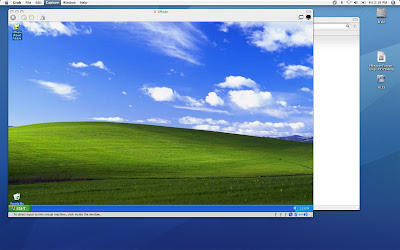
Unity is a really nice feature. If you haven't heard of it, it allows you to use your Windows applications on the Mac desktop instead of having to be restricted to its guest window. These little app windows even work with Expose and other mac features. Here's some screenshots...


This is how a vm normally looks. Great, I'm trapped in a box.


But now! Awesome, my windows are sitting side by side. Plus, if you'll notice, there's even an icon in the dock for each of the Windows applications running.


The coolest thing (IMHO) is that you can still do expose and stuff with these windowed Windows apps.

And just because I can, here's a YouTube video someone made:

Wednesday, June 20

"Intelligent" Custom 404 Page

This is fairly simple, but took me quite a while to find. I wanted to use a custom 404 page on my WIMP, but I wanted to be able to do SSI, php and whatever. Well setting the 404 page is easy enough.

  1. Open IIS Manager

  2. Right-click on the website and go to properties

  3. go to the tab Custom Errors

  4. scroll down to 404 and click edit
Now this is the part I couldn't find any info on. If you pick File from Message type: you can only use htm/html files. If you pick an shtml file, the page will display, but no includes will work. If you pick a php (or asp) file, when you try to access a nonexistent page, the browser will download the 404 page!

To be able to use shtml/php, you have to pick URL and give it a link from site root (e.g. /404.php). Hit OK and Apply and it's all set.

Now you can set your 404 pages to anything you want. One helpful thing is to have it take whatever they typed in and use it as a search term for the site.

Thursday, June 14

No document.write() Allowed

I have not been doing a good job of posting in here, but honestly, I haven't been doing anything interesting at all. I guess the latest thing I learned was about document.write().

It is NOT ALLOWED in XHTML 1.1 Transitional. It creates code that will not be valid by the W3C. I was unaware when I started so I had a page that used it. I was using it for a section that randomly loaded a picture and some text each time the page loaded. doing like:

document.write('<img src="'+images[randomNumber]+'" />")

etc.
What I ended up doing to make it valid was use innerHTML. I did:
function feature(){
var place = document.getElementById('featured');
place.innerHTML = '<img src="'+images[randomNumber]+'" /><p>'+words[randomNumber]+'</p>';
}

and now it comes up valid. I'm pretty sure you can use addChild in a similar manner and it would be valid as well.

Thursday, May 31

Resize Images with GD2

I found a bunch of places on the internets that help you with scripts to resize your images with gd2. These are all pretty cool because they resize your images while preserving their aspect ratio. Well I didn't want that so I had to read through the gd2 info on php.net. It's actually fairly simple, once I figured out what I was doing. I'm using a file uploaded from a form. So here's some simple resize code:

$imgrel = '../images/upload/'.basename($_FILES['pic']['name']); //gd wants relative paths
list($width,$height) = getimagesize($imgrel);
if($width<>150 || $height<>188){
$img_src = imagecreatefromjpeg($imgrel);
$img_dst = imagecreatetruecolor(150,188);
$imagecopyresampled($img_dst, $img_src, 0, 0, 0, 0, 150, 188, $width, $height);
imagejpeg($img_dst, $imgrel, 90);
}
There's the option of using imagecopyresized instead of imagecopyresampled, but I did that and it just doesn't look as good. If you don't know why, read this (I did). When I first did this, it wasn't working, but that was because I forgot the imagejpeg(). Oops. By the way, the 90 in that means 90% quality for that jpeg.

So now I suppose you want to resize your images keeping the aspect ratio. Well, I'm just going to share some code I found that seems to work for me. This one is from 9tutorials:
function resizeImage($originalImage, $toWidth, $toHeight){

list($width, $height) = getimagesize($originalImage);
$xscale = $width/$toWidth;
$yscale = $height/$toHeight;

//recalculate new size with default ratio
if($yscale>$xscale){
$new_width = round($width * (1/$yscale));
$new_height = round($height * (1/$yscale));
}else{
$new_width = round($width * (1/xscale));
$new_height = round($height * 1/xscale));
}
$imageResized = imagecreatetruecolor($new_width, $new_height);
$imageTmp = imagecreatefromjpeg($originalImage);
imagecopyresampled($imageResized, $imageTmp, 0, 0, 0, 0, $new_width, $new_height, $width, $height);
}

There we go. Easy as that. If you don't like that one, there's a different one at Netlobo which is the same as one on Travidal

Now just remember when you're doing this that GD2 is pretty process intensive so if you're resizing lots of images or large images, it's probably better to go with something like imagemagick.

Friday, May 18

Engineers vs. IT

I work at a university for a subset of Civil Engineering: Traffic Engineering. I'm just a lowly tech person, so I make websites and maintain computers and take orders from PhD's and Engineers. In case I haven't made it clear enough, to engineers it seems anyone who isn't an engineer is lower class citizen. And pretty stupid at that. I really have a problem with this. Not because I think I'm smarter than them at traffic engineering, but because I KNOW I'm smarter than them at technical stuff.

Now traffic engineering has been stepping into the world of technology with Intelligent Transportation Systems (ITS) and these poor engineers don't really have any idea. They seem to be taking baby steps and I think it's because of their opinion toward IT people, or non-engineers. For example, I met the technical support manager for Econolite, a major manufacturer of ITS equipment. He was really excited because their new software (version 9, just released this May) has IP support. "This means you can configure the cameras from anywhere!" he excitedly tells me. Yeah! That's the point of the internet! Up until then, you actually have had to go to the camera and connect to it with a laptop and a serial cable.

Now obviously this is a great idea, but it was still implemented pretty poorly. The webapp was clunky and written in Java. (The cool thing is since he's pretty high up, he's got some powers. I asked him if they developed in house and when he said yes, I suggested AJAX. 5 minutes later he tells me he sent an email to the developers suggesting it.) So what I'm wondering is, how much sooner would they have had IP connections to their cameras if it were IT people working on this instead of engineers?

Another example: I was reading about some plans for a particular city for phasing in their cameras. They have 300-ish cameras set up and only 20 some are being used. Their problem is they are using dial up to access the cameras. They want to set up a wireless mesh network between the lights for connectivity instead. Very cool idea. The problem they're running into is the project has come in way over budget for them. Now, this university I work for has another project from a different college (not engineering, but IT) which is trying to supply wireless networks around the city. Hmm... seems like a match made in heaven doesn't it?? Well, the engineering PhD's here didn't seem to thing so and threw a royal fit when that college tried to pair up with the city.

How much farther would we be if we could all just get along? How many other groups are separated by stupid ego issues and could have advanced so much farther if they just worked together?

Tuesday, May 15

PEAR Mail for Contact Info Check

I was asked to make an email that would send out every 6 months to see if the user's contact information had changed. So I needed to send an email to everyone in our database comprised of their information. I already mentioned using scheduled tasks, but we've got to make the file for it to run first. I thought it was going to be complicated, but it turned out to be quite easy. All I had to do was put the entire email into a while loop that went through the database. This is where the PEAR mail class definitely outshines PHP mail() because you can set a persistent connection to the server until you're done sending emails.

include 'Mail.php';

$get_contact = mysql_query("SELECT * FROM contact_info");
while($row = mysql_fetch_assoc($get_contact)){
$recipients = $row['email'];

$params['host'] = 'smtp.server.com';
$params['persist'] = true;

$headers['To'] = $row['FirstName'].' '.$row['LastName'].' <'.$row['email'].'>';
$headers['From'] = 'Me <mail@mail.com>';
$headers['Subject'] = 'Please Check Contact Information';

$body = 'Dear '.$row['FirstName'].' '.$row['LastName'].',

Some stuff about you should check your contact info. Here's your contact info';

//then just list their info in the body or add more to the body with .=
//then just mail it like before

$mail_object =& Mail::factory('smtp', $params);
$mail_object->send($recipients, $headers, $body);

} //don't forget you're in a while loop

Of course, if someone's gotten a new email and hasn't updated your list, you're still screwed, but oh well! What can ya do?

PEAR Templates

I recently discovered the place I work for has made their website templates as a PEAR extension. Very cool. I've been in the process of converting my pages. It's nice to work with because, for example, the standard no content template is a whopping 105 lines long. That's really long! The PEAR templates can do the same thing in 6 lines. I've reduced some of my pages from over 300 lines to less than 100. They still look the same and there's all those lines if you view the source on the page, but it's much much easier to work with this way. There's still some bugs, but they're working on that (hopefully).

So, I know this helps no one out there, it's just opinion. I would like to say that I've found the PEAR modules I've used mostly to be helpful (once I figured out how to use them).